

February 2024 — IT/AV is currently in the process of upgrading managed Windows 10 devices to Windows 11. The update is scheduled to commence on Feb. 12 starting at 5:00 PM. During this initial phase, a portion of users will receive the update, with the remaining users scheduled for the update on Feb.26. This update is essential to introduce new features such as Microsoft Copilot and Snap Layouts. Additionally, it ensures continued access to monthly security updates and fixes. For more information on the Windows 11 please follow this link.
If you encounter any issues related to these updates, please notify IT/AV by submitting a ticket here: Submit a Ticket
When will this happen? — The update will be made available Monday, Feb 5th, 2024 beginning at 5:00 pm. The update will automatically download to the device, provided your computer is connected to the internet. There will be no interruption to your device during the update. The installation of the update will take place outside the hours of 8:00 am to 5:00 pm to minimize any potential disruption to your workday.
Once installation is completed, you will need to restart your computer.
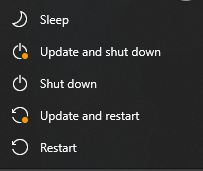
The Power icon, under the Start button, will provide options to apply the update.
You have 7 days to complete this update before it is forced.
How long will it take to apply the update after restarting?
It should take between 15 to 30 minutes for the update to apply after restarting. If it takes longer, or does not apply correctly, please open a ticket.
How do I verify if the update has applied?

Once the update is complete the new login screen should be available. Upon logging in, the update can be verified by right clicking on the start button (or ⊞ Win+X), accessing System and checking the Windows Specifications section.
If you have any questions regarding this update, please reach out to us.
———————-
Karthika Paramanathan
Manager, Information Technology